Restaurant QR Menu and Ordering Software
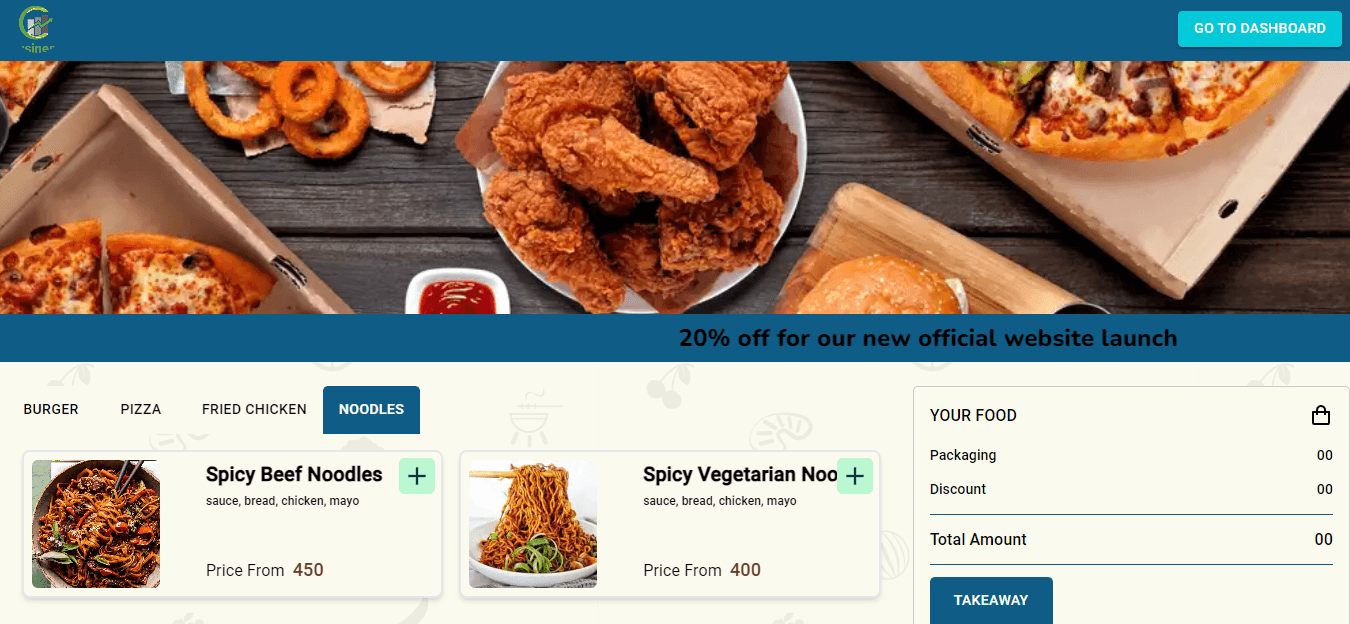
Digital Menu puts your menu on the customer's phone. Each table gets its own QR code: guests scan it, browse the menu by category, add items to a cart and place the order from the table.
Orders arrive on your dashboard with the table number, and your team moves them from pending to completed. You change the menu once and every table sees it immediately, with no reprinting.
Live demo: menu-demo.nexisltd.com. Ask us on WhatsApp for a demo table QR code and dashboard login.
What is in the software
QR code per table
Add tables and generate a QR code for each one.
Menu by category
Food items with photos, descriptions and prices, grouped into categories.
Cart and ordering
Guests add items to a cart and place dine-in or takeaway orders.
Order status for guests
Guests see their order confirmation and status on their phone.
Order management
Pending, completed and cancelled orders on your dashboard.
Sales reports
Today's report, monthly report and totals for orders, food items and categories.
Announcements
Show notices and offers to guests on the menu.
Customer feedback
A short survey for guests after their order.
How we work
- 1
Try the live demo
Open the demo and click through the real screens before you talk to us.
- 2
Walkthrough call
We show the parts that matter to you and note anything you need changed or added.
- 3
Quote and setup
You get a written quote. We then set up your account, branches and users and import your existing data.
- 4
Training and go-live
We train your admins and staff and stay with you through the first days of use.
- 5
Ongoing support
Updates, fixes and help for your team after go-live.
Frequently asked questions
How much does it cost?
It depends on the features, number of users and integrations you need, so we do not publish fixed prices. Send us your requirements on WhatsApp (01893-340053) or through the contact form and we will reply with a written quote.
Do guests need to install an app?
No. Guests scan the table QR code with their phone camera and the menu opens in the browser.
Can I change prices and items myself?
Yes. Update the menu from the dashboard and every table sees the change straight away.
Can I try it first?
Yes. The demo at menu-demo.nexisltd.com shows the guest menu and the restaurant dashboard. Message us on WhatsApp for access.
How long does setup take?
It mostly depends on preparing your menu items and photos. We set up your tables and QR codes and help you load the menu.
Do you provide support?
Yes. We train your staff and provide support and updates after go-live.
Get a quote for Restaurant QR Menu Software
Message us on WhatsApp or fill in the form below with what you need. We reply with questions or a written quote.
Phone
+880 1893-340053Office
Flat 302, House #28, Road #16, Sector #12, Uttara, Dhaka-1230, Bangladesh
Get a Free Consultation
Tell us what you need and we'll reply with questions or a written quote.